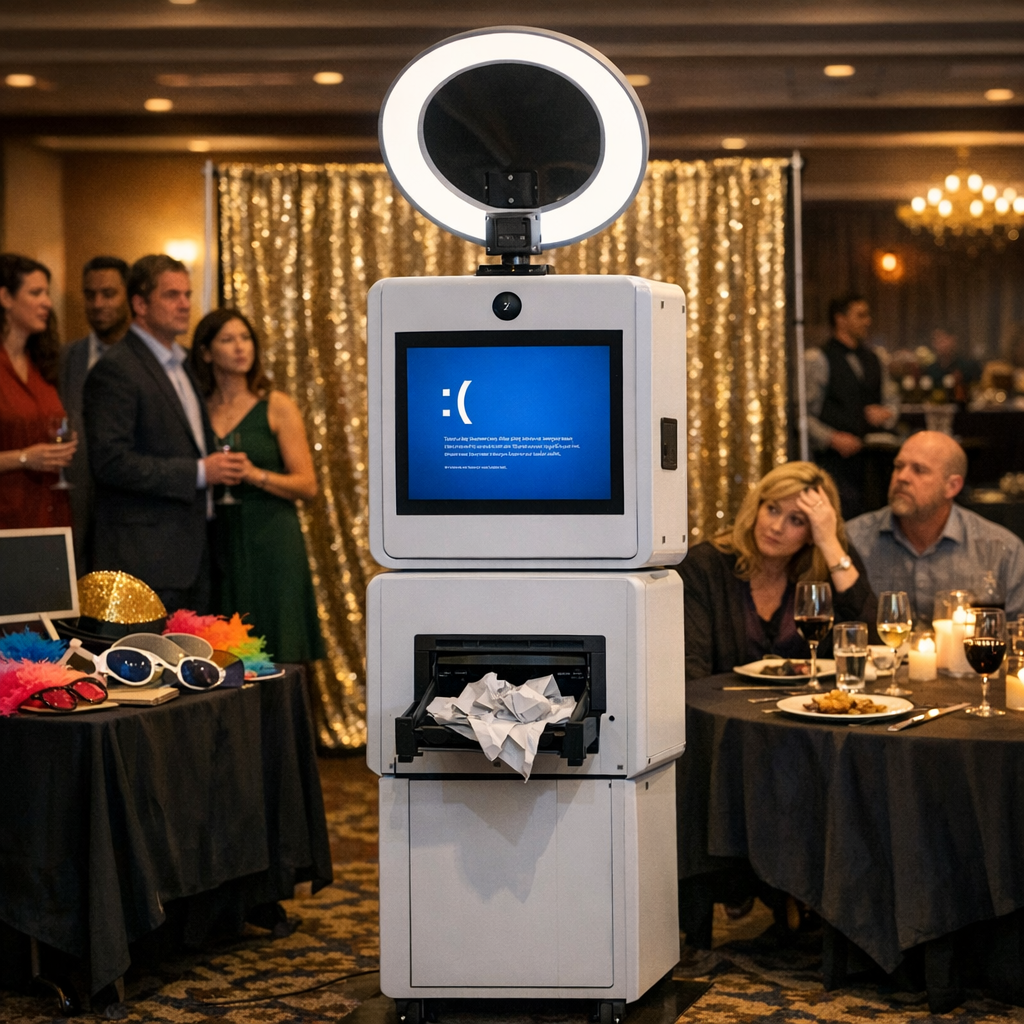
When Polished Tech Breaks Under Pressure
About ninety minutes into what should have been a smooth, 150-person corporate dinner, the photo booth software crashed. What looked like a polished, professional setup on paper suddenly became a bottleneck of waiting guests and awkward silence. It took nearly twenty minutes to recover—long enough for the client to notice, for guests to grow impatient, and for the issue to surface in the post-event debrief. Moments like this aren’t just technical hiccups; they’re reputational risks.
After six years coordinating events, and three separate photo booth-related issues—all tied to software rather than hardware—a clear pattern emerges. Reliability isn’t just about how a setup looks; it’s about how well it performs under pressure. In this article, we’ll unpack why software failures are increasingly common in event tech, what separates prepared vendors from unprepared ones, and how you can vet vendors more effectively to avoid mid-event surprises.
The Hidden Risk Behind “Polished” Event Technology
At a glance, most event tech setups look impressive. Sleek photo booths, professional lighting, branded overlays—everything signals quality. But what’s visible is only half the story. The real risk lies in the software running behind the scenes.
In all three problematic events mentioned earlier, the hardware performed as expected. Cameras worked. Printers were fine. The breakdown happened at the software layer—crashes, inconsistent outputs, or poorly configured settings that didn’t match the event environment.
This reflects a broader trend across industries. Software today is often developed under pressure to deliver more features, faster timelines, and lower costs. Stability can become secondary. In event environments, where real-time performance is non-negotiable, this tradeoff becomes painfully visible.
A developer commenting on a similar situation put it bluntly: software doesn’t fail when it’s convenient—it fails when people are watching. And in a live event setting, there’s no buffer. Every second of downtime is amplified.
Suggested visual: A simple diagram showing the difference between hardware reliability and software reliability in event setups could help illustrate this concept.
Why Event Software Fails at the Worst Possible Time
Event environments are uniquely stressful for software systems. Unlike controlled office or lab conditions, events introduce unpredictable variables that can expose weaknesses.
Some of the most common causes include:
High usage spikes. A photo booth might go from idle to constant use within minutes, especially during peak social moments.
Network instability. Many systems rely on cloud syncing or online features that can falter with weak or overloaded connections.
Configuration mismatches. Settings that work in one venue may not translate well to another due to lighting, space, or user flow differences.
Unpatched bugs or rushed updates. New features can introduce instability if not thoroughly tested in real-world conditions.
What makes these failures particularly problematic is timing. They rarely happen during setup or testing—they happen when the room is full and expectations are high.
Suggested visual: A timeline graphic showing “pre-event testing vs. live event conditions” could highlight how stress factors increase during actual use.
Prepared Vendors vs. Empty Assurances
Not all vendors approach reliability the same way. One of the clearest distinctions you’ll notice during vetting is how they respond to questions about failure scenarios.
Less experienced or less prepared vendors tend to focus on assurances: “It’s very reliable,” or “We’ve never had issues.” While reassuring on the surface, these answers often indicate a lack of contingency planning.
Experienced vendors, especially those who have dealt with failures before, respond differently. They acknowledge that issues can happen and focus on recovery:
How quickly can they restart the system?
Do they have a backup device or duplicate setup?
Can they switch to an offline mode if connectivity fails?
What’s their protocol for minimizing guest disruption?
These vendors don’t promise perfection—they demonstrate preparedness. That mindset is far more valuable in a live event context.
Suggested visual: A side-by-side comparison chart of “vendor responses” (assurance vs. contingency-focused) would make this distinction clear.
How to Vet Vendors and Reduce Risk
After encountering repeated software-related issues, many event coordinators refine how they evaluate vendors. The goal shifts from surface-level qualifications to operational resilience.
Here’s a simple step-by-step approach you can follow when vetting event tech vendors:
Start with the basics, but don’t stop there. Experience matters, but it’s not enough to ask how long they’ve been in business. Ask how many events they’ve run using the exact setup they’re proposing.
Dig into the technology stack. What software are they using? Is it proprietary, licensed, or custom-built? How often is it updated?
Ask about failure scenarios directly. Instead of asking if things go wrong, ask what happens when they do. Look for detailed, confident answers.
Request examples. Have they handled high-volume corporate events before? What challenges did they face, and how did they resolve them?
Evaluate redundancy. Do they bring backup equipment or alternative workflows? A single point of failure is a red flag.
Even with strong vendors, there are steps you can take as an event coordinator to reduce the likelihood and impact of technical issues.
Build buffer time into your schedule. Allow vendors to fully test their systems in the actual event environment, not just during setup.
Clarify expectations in advance. Ensure vendors understand the flow of the event, peak usage times, and any unique environmental factors.
Have a visible backup plan. If a photo booth goes down, what’s the alternative engagement for guests? Even a simple fallback can maintain energy in the room.
Stay observant during the event. Early signs of lag or inconsistency can sometimes be addressed before a full failure occurs.
Document issues during and after the event. This helps improve future planning and vendor selection.
Suggested formatting: This section could be enhanced with a bullet-point checklist for quick reference by event planners.
Why Reliability Outweighs Features
In today’s event landscape, there’s a strong emphasis on customization and “wow” factors—AI filters, instant sharing, branded animations. While these features can enhance the guest experience, they often come at the cost of increased complexity.
The more complex a system becomes, the more potential points of failure it introduces. In high-stakes environments like corporate events, reliability should take priority over novelty.
A simpler, stable setup that runs flawlessly will always outperform a feature-rich system that crashes mid-event. Guests may not remember every feature—but they will remember standing in line while nothing works.
Event technology has the power to elevate experiences, but it also introduces new risks—especially when software reliability is overlooked. As seen in multiple real-world scenarios, the most common failures aren’t visible in advance. They emerge under pressure, when timing matters most.
The key takeaway is not to expect perfection, but to demand preparedness. Vendors who understand their systems, anticipate failure points, and plan for recovery are the ones who protect both the guest experience and your reputation.
As you plan your next event, go beyond the surface. Ask better questions, prioritize reliability, and choose partners who are ready for the unexpected. Because in live events, it’s not about if something goes wrong—it’s about how quickly and effectively it’s handled.
References and Further Reading
For those interested in exploring this topic further, consider looking into resources on software reliability engineering, event technology best practices, and vendor risk management. Industry blogs such as EventMB and Skift Meetings often cover trends in event tech and operational challenges. For a technical perspective, materials on system resilience and incident response from organizations like Google’s Site Reliability Engineering (SRE) team provide valuable insights.
Additionally, case studies on live event production and post-event debrief analyses can offer practical lessons that apply directly to real-world scenarios.